See every renewal before it auto-extends

A register of supplier contracts linked to their vendors, with a renewals dashboard, licence entitlements against actual use, and spend by contract type and vendor.

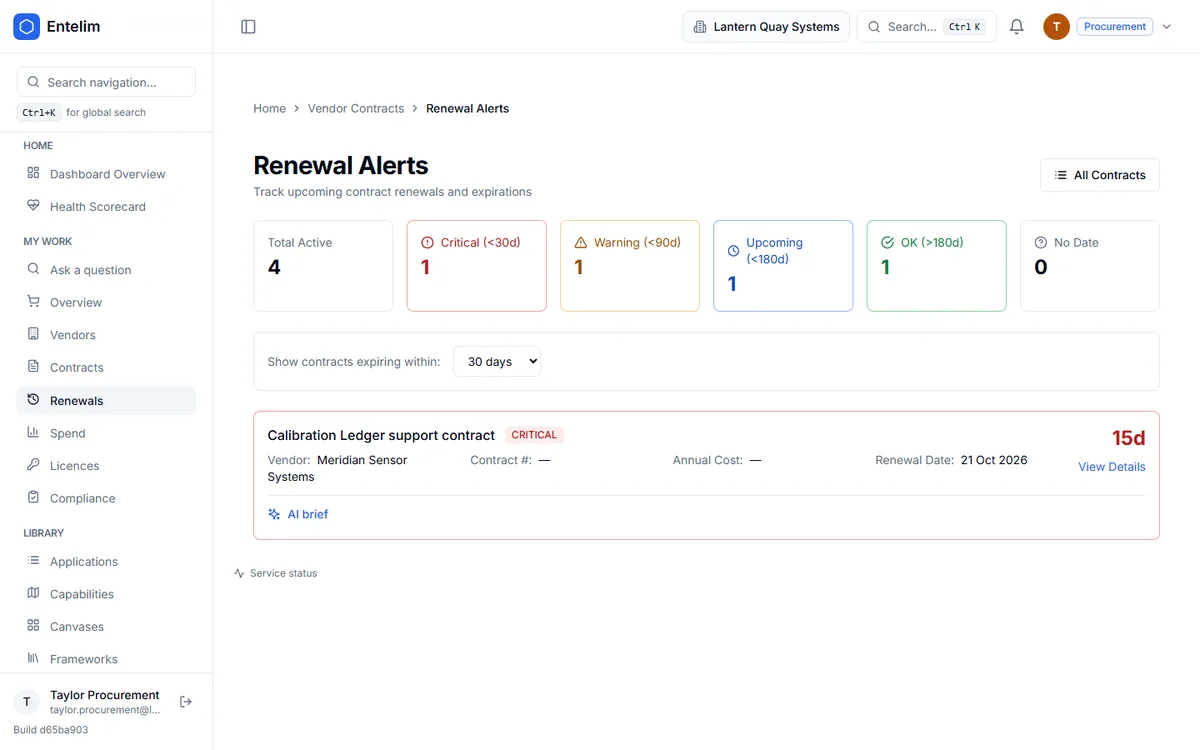
Screenshot of the Procurement module's contract renewals dashboard.
The contract renewals dashboard, showing upcoming vendor renewal dates.

Who it is for

Made for the people who answer for this.

  • A procurement lead who owns the contract register and the renewal calendar.
  • A finance lead who needs licences and spend by vendor.
  • An IT operations lead who must know which licences are unused before a renewal.

Questions it answers

Ask it the questions you are asked.

Which contracts renew in the next ninety days?

Asked by a procurement lead.

Which licences are unused before we renew?

Asked by an IT operations lead.

Are we deploying more than we are entitled to?

Asked by a finance lead.

Who are our biggest vendors by annual spend?

Asked by a CFO.

How it works

From your data to an answer, in steps.

  1. Step 1

    Add the contracts

    Vendor, dates, value, annual cost and owner.

  2. Step 2

    Watch the renewals

    Contracts counted as critical, warning or upcoming by days to renewal.

  3. Step 3

    Record the licences

    Entitled, deployed and used, per contract.

  4. Step 4

    Read the spend and prepare the renewal

    Spend by contract type and vendor, and an advisory renewal brief where AI is configured.

What contract management software is

Contract management software is the system of record for every agreement an organisation has with its suppliers. It holds what each contract covers, its value, its dates and who owns it. Its job is to replace the two usual failures of running contracts by inbox and spreadsheet: a renewal that auto-extends because nobody saw it coming, and a set of terms nobody can find when an audit or a dispute asks for them.

Three terms are worth fixing:

  • A renewal date is the date a contract renews or expires. Entelim uses the contract's renewal date, and the end date where no renewal date is set.
  • Auto-renewal is a clause that extends the contract for another term unless you give notice. It is the usual cause of paying for something you meant to drop.
  • A licence entitlement is the number of users, devices or other units a contract lets you use. Compliance means the number you deploy and use matches what you are entitled to.

Procurement software is the wider process: sourcing, requesting, approving and paying. Once an organisation is past purchase-order basics the two overlap heavily, because the same contract record is what the renewals view watches, what a spend report totals and what a licence check reads.

How it works in Entelim

  1. Add the contracts. Choose New Contract and enter the name, contract number, vendor, description, type, category, status, total value, annual cost, currency, start date, end date, renewal date, whether it auto-renews, and the contract owner. If your organisation has an AI provider configured, you can paste the contract text into Extract from contract text and the fields it finds are filled in for you to review before you save. Fields the text does not state stay blank. It works from pasted text, not an uploaded file.
  2. Watch the renewals dashboard. The renewals dashboard counts contracts as critical (under 30 days), warning (under 90 days), upcoming (under 180 days), ok or unknown, and lists the contracts due inside a window you choose: 30, 60, 90, 180 or 365 days. Expired contracts are included, so a missed renewal does not drop off the list. The screenshot on this page shows this dashboard.
  3. Record the licences. Add a licence entitlement under a contract with the product, licence type, licence metric, quantity entitled, quantity deployed, quantity used and unit cost. Entelim works out the compliance status itself from the quantities: over-deployed when you deploy more than you are entitled to, under-utilised when deployment is under half of the entitlement, compliant otherwise. A licence with no deployment recorded has no status, not a made-up one.
  4. Check compliance and shelfware. The compliance dashboard counts licences as compliant, warning or violation, shows overall utilisation, and puts a value on the two risks: over-deployed licences at their unit cost, and shelfware, which is entitled but unused licences at their unit cost.
  5. Read the spend. Spend analytics shows total contract value, annual recurring cost, spend by contract type and top vendors by annual spend. A contract with no value or annual cost is left out of the total and counted as excluded, never added as zero.
  6. Prepare the renewal. Where AI is configured, a renewal brief for a contract, a licence position summary and spend recommendations are available as advisory text. They write nothing to your records. You act on them through the contract and licence screens.

What you get

  • A contract register with value, annual cost, dates, auto-renewal flag, status and owner for every agreement.
  • A renewals dashboard with critical, warning and upcoming counts and a window you choose, from 30 to 365 days.
  • Licence entitlements with entitled, deployed and used quantities, and a compliance status calculated from them.
  • Licence compliance totals, utilisation, the cost of over-deployment and the value of shelfware.
  • Spend by contract type and top vendors, with excluded contracts counted openly.
  • Each contract linked to its vendor and the licences beneath it.
  • Optional AI help to extract contract fields from pasted text, draft a renewal brief and summarise licence and spend positions.

Limits

Procurement is a register and a set of views. It is not a purchase-order, approval or payment system, and it does not raise or pay invoices.

The AI features need an AI provider configured for your deployment. Without one they are switched off, and the rest of the module works as normal.

The contract extraction reads text you paste in. It does not read a PDF you upload, and you review every field before it is saved.

The contract record shows its vendor and its licences. It does not itself list the applications that depend on the supplier. To ask what stops if a supplier fails, use what happens if a supplier fails.

Plan

Procurement is part of every Entelim plan, which differ by how many people can edit and by the extras listed on the pricing page. See Entelim pricing or browse all modules.

Start today

Connect your tools. Get a cited answer.

Free for up to three people, with no trial clock. Self-host it free under AGPL-3.0, at any size.