Write the business case for a technology investment

Capex, annual opex, three-year cost, return, payback and NPV, linked to the capability or initiative the money funds.

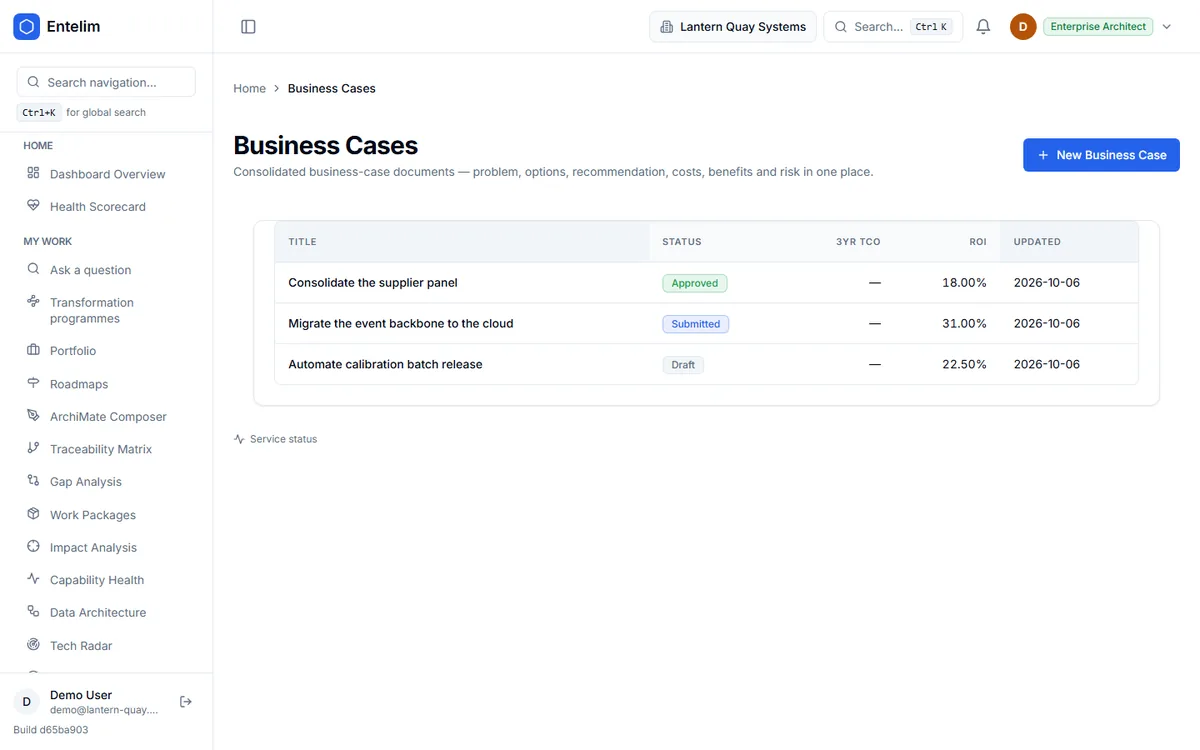
Screenshot of the Business Case module's list of business cases.
Business cases with their status, three-year TCO and return on investment.

Who it is for

Made for the people who answer for this.

  • A CIO or head of architecture who has to defend a technology investment to the finance director or the board.
  • A programme sponsor who needs the case on one page before a funding round.
  • An enterprise architect asked to show that a consolidation or a migration pays for itself.

Questions it answers

Ask it the questions you are asked.

Is this investment worth making?

Asked by a CIO before a board meeting.

What does this migration cost over three years?

Asked by an enterprise architect.

What was this past decision supposed to deliver?

Asked by a programme sponsor.

Which capability does this money fund?

Asked by a finance director.

How it works

From your data to an answer, in steps.

  1. Step 1

    Create the case

    Give it a title and a short description.

  2. Step 2

    Link it to what it funds

    Link a capability, a strategic initiative and a solution already in your model.

  3. Step 3

    Write the argument and fill in the figures

    Executive summary, options, recommendation, costs, benefits and return.

  4. Step 4

    Pull figures from the model, then export

    Fill blank fields from linked records and share the case.

What a business case is

A business case is the document a sponsor takes to a budget holder to justify a change. It states the problem, lists the options (including doing nothing), recommends one, and shows what it costs and what it returns. Finance teams read the numbers first, so the numbers have to agree with each other.

Five terms carry most of the weight:

  • Capex is the one-off cost of making the change, such as licences, build and migration.
  • Annual opex is what the change costs each year to run once it is live.
  • Three-year TCO (total cost of ownership) is capex plus three years of opex.
  • ROI (return on investment) is the net gain as a percentage of what you spend.
  • Payback is the number of months before the cumulative benefit covers the cost.

A sixth, NPV (net present value), values the three years of net benefit in today's money and subtracts capex. A positive NPV means the change earns more than the discount rate you chose.

The usual failure is not bad arithmetic. It is a case written in a slide deck, with costs copied from a spreadsheet that has since changed, and a benefit figure nobody can trace. A year later no one can say whether the case was right.

How it works in Entelim

  1. Create the case. On the Business Cases list, choose New Business Case and give it a title and a short description. If you describe the problem in a sentence or two, the optional Generate with AI box suggests a title and description for you to review. It is available where your organisation has an AI provider configured, and nothing is saved until you create the case.
  2. Link it to what it funds. Set a status (draft, submitted, approved or rejected) and, optionally, link the case to one capability, one strategic initiative and one solution already in your model. The links are what let the case draw on figures you already hold.
  3. Write the argument. The case page has a section for each part of the document: executive summary, reasons (strategic context), business options, recommendation, expected benefits, expected dis-benefits, timescale, costs, investment appraisal and major risks. Each section saves as you edit it. Where AI is configured, a Draft with AI button on a section proposes text from the rest of the case and its linked records. It never saves the draft for you.
  4. Fill in the figures. The Costs, Benefits and ROI panel has fields for capex, annual opex, three-year TCO, annual financial benefit, ROI % and payback in months. NPV sits beside them, labelled three-year at a 10 per cent discount rate. You cannot type into it. It is worked out from capex, annual opex and annual benefit, and it shows a dash until at least capex or benefit is set.
  5. Pull figures from the model. Pull financials from links reads the linked capability's latest cost allocation, the initiative's budget and the solution's cost, and fills only the fields you have left blank. Where you have already typed a figure, it leaves your number alone and reports the figure it found beside yours, so you can see where they differ. When it fills a blank three-year TCO, it uses capex plus three times annual opex. Administrators, architects and business architects can run it.
  6. Export and share. Export the case as an image, or download it as a Mermaid, Lucidchart or Archi (.archimate) file. Once you have saved an entry on the case's canvas, a share link appears.

The screenshot on this page shows the list of business cases with each case's status, three-year TCO and ROI.

What you get

  • A business case record with the problem, options considered, recommendation, expected benefits and major risks in one place.
  • Capex, annual opex, three-year TCO, annual financial benefit, ROI % and payback in months on every case.
  • NPV over three years at a 10 per cent discount rate, recalculated whenever the inputs change, never stored as a stale number.
  • A status on every case (draft, submitted, approved, rejected) and a list that shows status, three-year TCO and ROI side by side.
  • Links from each case to the capability, strategic initiative and solution it relates to.
  • A cross-check that shows where a figure you typed differs from the figure held in the linked records.
  • Export as an image or as Mermaid, Lucidchart or Archi files.

Limits

Entelim does not invent figures. If you have not entered a benefit, the case has no ROI or NPV to show, and the field stays empty.

ROI and payback are figures you enter, or ROI is pulled from linked records. Entelim does not derive payback from a cash-flow schedule, and NPV uses one fixed three-year horizon and a 10 per cent rate. If your finance team uses a different horizon or rate, work it out in your own model and enter the result.

The case is a document with figures. It is not a budgeting or forecasting system and does not replace the finance team's own model. Pair it with the Portfolio module to track the initiative once it is funded, and with the Roadmaps module to place it in time.

The Investment Analysis module is a separate view. It scores your capabilities for investment priority. It does not rank business cases.

Plan

The plans differ by how many people can edit and by the extras listed on the pricing page, not by which modules you get. See Entelim pricing or browse all modules.

Start today

Connect your tools. Get a cited answer.

Free for up to three people, with no trial clock. Self-host it free under AGPL-3.0, at any size.