A model of your organisation you can question

Ask in plain words what an outage, a change or a new risk would reach, and get a table you can check, with the reason behind every connection.

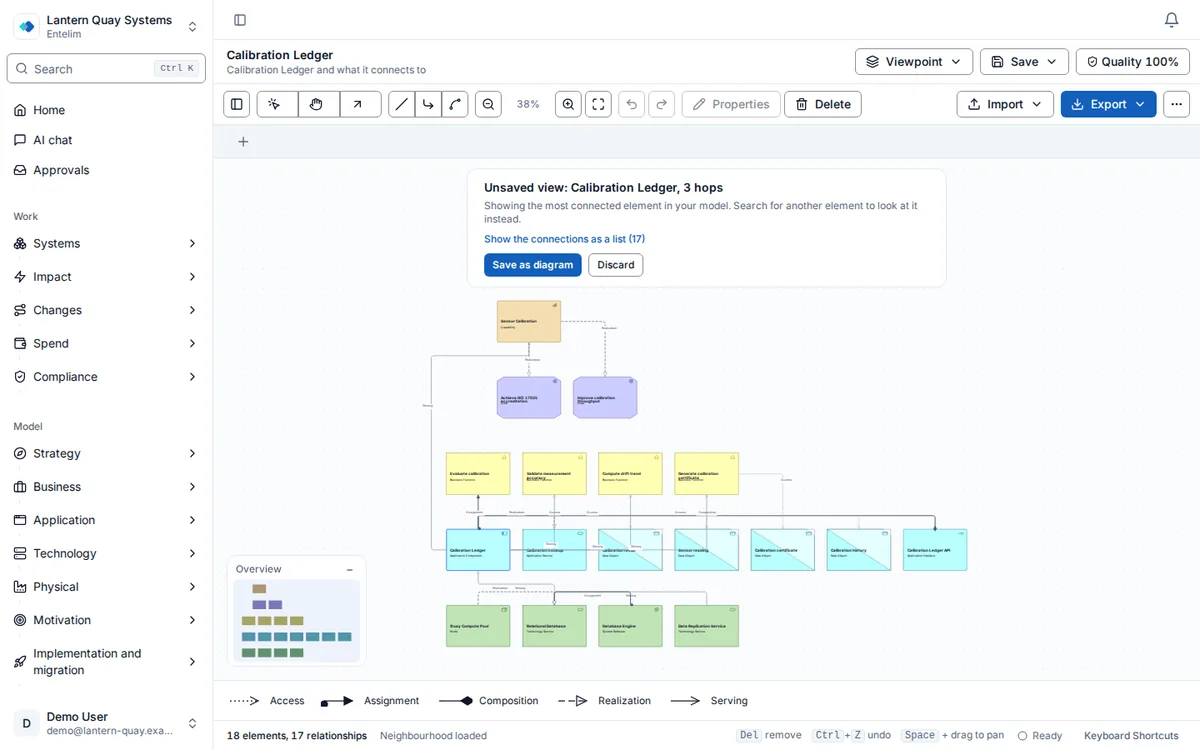
Screenshot of the twin map showing one application and the capabilities, processes, technology and data it connects to, grouped by architecture layer.
The twin map: one application and everything it connects to, banded by architecture layer.
Opens the digital twin on Calibration Ledger, the most connected system in the model, with its elements and relationships spread over the business, application and technology layers. The connections open as a list that names each one, from one element to the next.

Who it is for

Made for the people who answer for this.

  • An enterprise architect who has to answer what something touches without redrawing a diagram first.
  • A CTO or risk owner who needs to know what a failure or a change reaches before the meeting, not after it.
  • A portfolio manager or compliance lead who wants one model to answer cost, programme and control questions.

Questions it answers

Ask it the questions you are asked.

What stops if our payment provider goes down?

Asked by a CTO preparing for an outage.

Which risks reach this application, and who owns the mitigation?

Asked by a risk owner.

Which programmes change this system?

Asked by a portfolio manager.

How did the model look on the day of the audit?

Asked by a compliance lead.

How it works

From your data to an answer, in steps.

  1. Step 1

    Ask about one element

    Choose a ready-made question and pick the application, process or other element it is about.

  2. Step 2

    Read the answer

    Every element reached is listed with its owner and marked as recorded or worked out.

  3. Step 3

    Open the proof

    See the chain of recorded relationships behind any worked-out connection, who recorded it and when.

  4. Step 4

    See it on the map

    Open the same element on a map of what it connects to, layer by layer, or look at the model as it stood on a past date.

What a digital twin of an organisation is

A digital twin of an organisation is a model that mirrors the real one: every application, process, capability and piece of technology you run, and the relationships between them — this system depends on that platform, this capability is realised by that application, this risk threatens that process. Most organisations hold the pieces of this picture in separate places: a spreadsheet of applications, a diagram from a past project, a risk register nobody has reopened since the audit that produced it. None of those on its own can answer a question that crosses more than one of them, such as what actually happens if one system goes down, because the dependency was never written down anywhere a computer can read.

Entelim's twin is built from two kinds of connection. An explicit relationship is one you recorded or imported directly, in ArchiMate — the open modelling notation behind the model, with element types such as application component, business process or node, and relationship types such as serves, realises or depends on, across the business, application and technology layers. A derived relationship is a further connection Entelim works out, rather than one anyone recorded by hand, from a chain of explicit relationships, by a named rule, rechecked whenever the model changes. On screen, Entelim calls this "what we worked out".

How it works in Entelim

  1. Ask a question about one element. Open Ask and choose one of its lenses — Entelim's name for a ready-made question it can answer about any element: what breaks if it fails, what it costs and how it is rationalised, what could hurt it, what it is trying to achieve, what is changing around it, what data it holds, or which controls apply to it. Type a name and pick the application, process or other element the question is about from the matches.
  2. Read the answer. The impact answer lists every element reached, each marked as explicit or worked out, with its recorded owner and a link straight to the twin map. The risk answer lists each risk with its likelihood-times-impact score and what it touches. The strategy and programme answers list the initiatives and work packages against the element, each with how much of the model it reaches. The data answer lists what the element holds or produces, who stewards it and where it flows. The compliance answer lists the controls it is mapped to and any with no recorded evidence.
  3. Open the proof. Any "why?" button on a worked-out row opens the provenance drawer: a plain-terms explanation, the chain of explicit relationships the answer was built from — each link resolved to its two elements, the rule behind it, and who recorded it and when — and any decision recorded against the elements in that chain. A link that no longer exists in the model says so, rather than being dropped silently from the chain.
  4. Switch to the twin map. The same element opens on a graph of what it connects to, banded by architecture layer, with a hop-depth slider running from one to five connections out and a toggle to include what Entelim worked out alongside what you recorded. Select any node for its own panel, with the same owner field and "why?" drawer, and a table underneath the graph listing the same rows.
  5. Compare the model over time. Model as of shows every element and relationship exactly as they stood on a date you choose. Changes between two dates lists what was added, updated or removed in between, who changed it and the reason, if one was recorded, with the version before and after each change.

What you get

  • An impact answer for any element: every system, process or capability it reaches, each marked explicit or worked out, with its recorded owner and a link to the twin map.
  • A risk, strategy, programme, data and compliance answer for the same element, each reached from the same Ask screen.
  • A provenance drawer on every worked-out row: the chain of explicit relationships behind it, who recorded each link and when, and any decision recorded against it.
  • A twin map of what any element connects to, grouped by architecture layer, with hop depth and a worked-out-connections toggle you control, plus a table view of the same rows.
  • A status panel on Ask showing when connections were last worked out, how many exist, and how many may be out of date and why.
  • The model exactly as it stood on a past date, and a list of what changed between any two dates, by whom and why.

Limits

Ask and the twin map answer only from what is in your model. An element with no recorded relationship shows no connections, and an application with no recorded owner shows that plainly, rather than a guess at either. Entelim does not scan your network or your cloud estate to find what is running; what the twin map shows is what was recorded or imported.

Accountability — who's accountable for an element — is recorded ownership on the application record and in Org Chart & RACI, not a separate answer on Ask today.

A worked-out connection is rechecked whenever the model changes; it can briefly be out of date between a change and the next check, and Ask's own status panel states how many connections may be out of date and why. Budget and cost figures on the strategy and programme answers are visible only to roles with budget authority; every other role sees the same row without the figure. Pair the twin map with Architecture Model for the elements and relationships it reads, and the formats you can import them from.

Plan

Ask and the twin map are part of every plan, including the free Community plan for up to three people. See Entelim pricing for Startup, Team and Enterprise, browse all modules, or see how Entelim compares with other enterprise architecture tools.

Start today

Connect your tools. Get a cited answer.

Free for up to three people, with no trial clock. Self-host it free under AGPL-3.0, at any size.