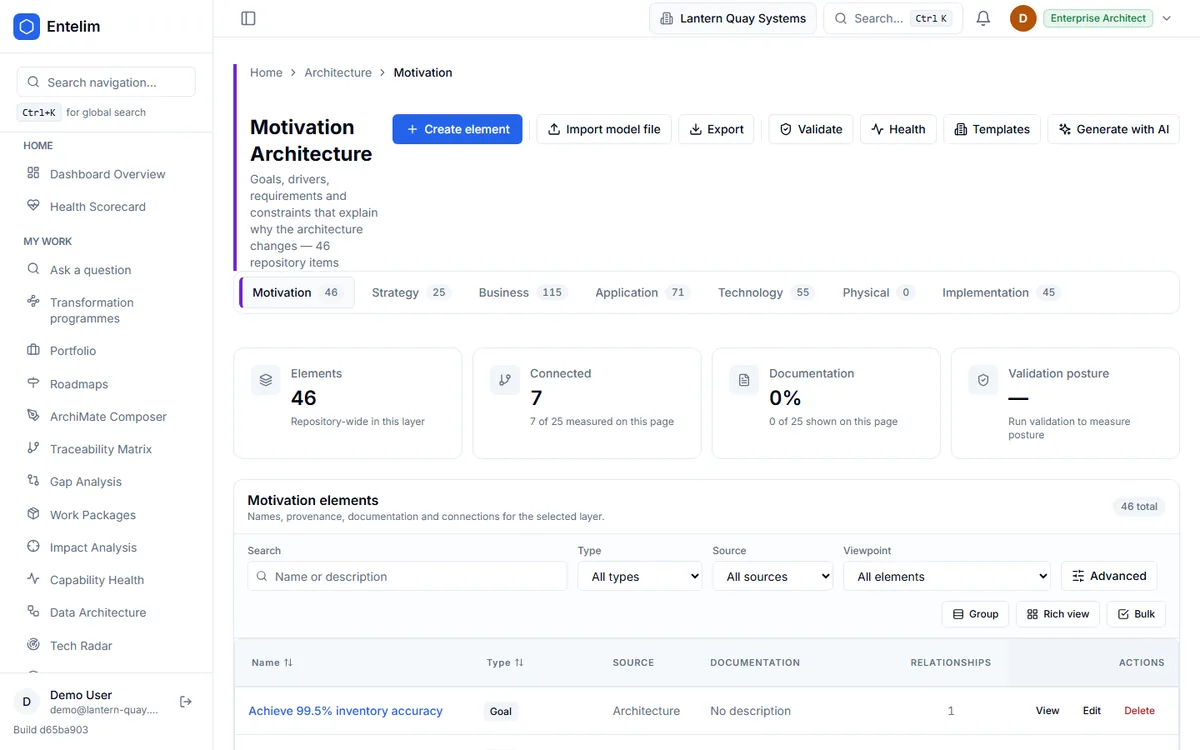
Every element of your architecture in one browser

Business, application, technology and motivation layers in one page, with a filter that takes you straight to any layer. It is where an imported model lands.

Screenshot of the Architecture Model module's ArchiMate element browser.
The ArchiMate element browser, spanning the business, application, technology and motivation layers.

Who it is for

Made for the people who answer for this.

  • An enterprise architect who has just imported a model and wants to see what came in.
  • An architect who needs to find any element at any layer without opening a separate tool.

Questions it answers

Ask it the questions you are asked.

What elements does our model hold at each layer?

Asked by an enterprise architect after an import.

Which applications sit under this business process?

Asked by a business architect.

Which goals and drivers is this change meant to serve?

Asked by a solution architect.

Did the import bring in everything in the file?

Asked by an architect checking a migration.

How it works

From your data to an answer, in steps.

  1. Step 1

    Bring in your model

    Import an existing ArchiMate model, or build it from GitHub or Jira.

  2. Step 2

    Browse the layers

    Business, application, technology and the goals and drivers behind them, in one list.

  3. Step 3

    Filter to a layer

    Go straight to the layer you need.

  4. Step 4

    Open an element

    Read its record and what it connects to.

What this module does

Every layer of your architecture — business, application, technology, and the goals and drivers behind them — in one browsable page, with a filter that takes you straight to any layer without it needing to be a separate destination.

Start today

Connect your tools. Get a cited answer.

Free for up to three people, with no trial clock. Self-host it free under AGPL-3.0, at any size.