Know what you run, who owns it and what breaks if it fails — starting from GitHub or Jira
A company of fifty to five hundred people runs on more systems than anyone can list from memory, and the list that does exist is a spreadsheet. Entelim starts from the tools your engineers already use. Sign up free and connect GitHub or Jira: Entelim reads them and proposes your applications, who owns them and what depends on what, and nothing enters the model until a person approves it. If your list lives in a spreadsheet instead, import that beside it. Then ask what breaks if a system fails and read the answer from the model. A CTO or VP of Engineering can start on the free Community plan, with no sales call first.

What a CTO or VP of Engineering does at this size
At a scale-up the person who runs engineering is also, in practice, the architecture function, the procurement reviewer and the one who gets the call when something is down. The questions are plain: what do we actually run, who owns each piece, and what else stops if this one does. They arrive from the board, from a customer's security questionnaire, from an acquirer's diligence list, or from your own on-call rota, and the usual answer is a spreadsheet that is out of date the day it is shared. A CTO or CIO at a larger company reads scorecards built over a long-running model; at this size the first job is simply getting the estate recorded once, in one place, with an owner on every line, and the quickest way there is to read it from the tools that already hold it.
The screens you will use
- Connect GitHub, in the admin connectors. Paste a read-only token and Entelim reads your repositories and proposes a first model: your applications, their parts, who owns them and how they depend on each other. The proposals wait for a person's approval.
- Connect Jira, in the same place, which brings your backlog in as requirements and sends review board decisions back to Jira as epics.
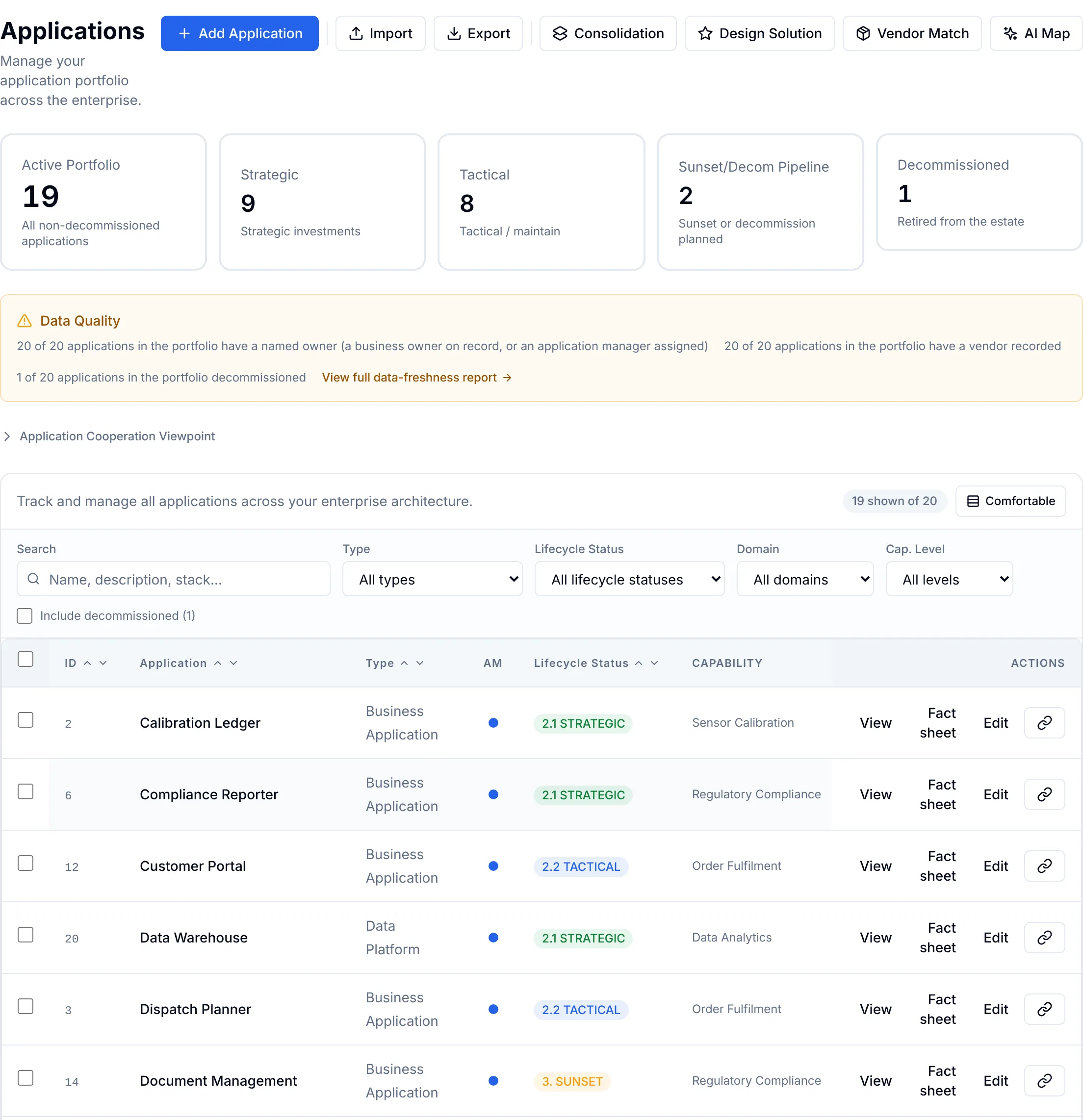
- Import, on the Applications screen, the second route for a spreadsheet you already keep. It takes an Excel, CSV or JSON file, shows its first rows, lets you choose which field each column belongs to, and offers a template to start from. Choose Merge to update applications that already exist or Duplicate to add them as new ones.
- Applications, the portfolio the import fills, with a count of how many applications have a named owner and how many have a vendor recorded, and a fact sheet for each application showing the owner recorded against it.
- The AI chat, where you ask in plain words what breaks if a system fails. It lists what is recorded as connected to it and cites the record behind each line. Where nothing is recorded it says so plainly instead of guessing, and Work them out now extends the answer to indirect connections. Any element opens in the Composer — see Digital twin of your organisation.
- The health scorecard, which reads the elements, open risks and review pipeline recorded so far and marks anything not yet measured as not measured.
- Roadmaps, with plateaus, gaps and work packages on one timeline — see Roadmaps.
A first sitting with Entelim
- Sign up with your name, an email address and a password.
- In the admin connectors, connect GitHub with a read-only token, or Jira with your instance details.
- Approve the applications and owners it proposes. Prefer a spreadsheet? On Applications, choose Import, upload it and match each column to a field (application name, owner, description).
- Check the portfolio's owner count: every application with a named owner is counted.
- Open the AI chat and ask what breaks if the system you worry about most fails.
What you hand over
A portfolio of every application GitHub, Jira or your spreadsheet named, each with its owner. A first answer, from the AI chat, to what a given system connects to. A starting point for the rest: relationships, capabilities and review decisions can be added to the same model as the company grows.
Works with
Bring an existing model in from an Archi or ArchiMate Open Exchange file — see import your model. Connect an AI assistant such as Claude, read-only and scoped to your own organisation's data, to ask the same questions from a tool your team already uses. Administrator accounts sign in with an authenticator app.
Limits
An answer in the AI chat comes from what is recorded: a system with no recorded connections shows none, and the fuller picture builds as relationships are added to the model. Import brings in the fields your columns are matched to; anything not matched is left out, so the record is as complete as the sheet is. The review board, roadmap and scorecards are there when the company needs them, but a first sitting does not require any of them.
Frequently asked questions
Do I need to know ArchiMate or TOGAF?
No. Import and the AI chat work from a plain spreadsheet and a plain question. The ArchiMate 3.2 model underneath is there for the architects you hire later; you do not have to learn it to get the first answer.
Do I have to connect GitHub or Jira?
No. They are the quickest start because the information is already there, but the spreadsheet import works on its own. Both can feed the same portfolio.
What file can I import?
An Excel (.xlsx or .xls), CSV or JSON file. The import shows the first ten rows and lets you match each column to a field before anything is saved, and a template is available if you would rather start from one.
What does it cost for a company our size?
Community is free for one organisation of up to three people. Companies of 50 to 500 people use the Team plan, at $29 per editor a month, where people who only ask questions are free. Enterprise is sold by contract, from $24,000 a year. See full pricing.
Can my engineers see it without a paid seat?
Yes. People who only read and ask questions are free on every plan. An editor seat is for people who change the model — importing, recording owners, adding relationships.
Do you offer help getting started?
Yes. The architecture health check is an assessment run on your own application data, with a written report and a read-out call.
Start free
Start free on the Community plan for one organisation of up to three people, connect GitHub or Jira, or import your spreadsheet, and ask the question you have been getting asked. Growing teams move to Team, priced per editor. See full pricing.
Other roles
- Business architect tools that tie capabilities and value streams to the work that changes them
- Chief architect software for an architecture function you can account for
- Data architect tools that tie every data flow to a real element in the model
- Enterprise architect tools for one model, not three disconnected ones
- IT portfolio manager software for a portfolio you can defend at budget time
- Know what your startup runs and who owns it, from the day you connect GitHub
- Security architect tools that show what a risk reaches, not just where it was logged
- Solution architect tools for a design the review board can actually decide on
- Take a change through the review board with its evidence pinned to the decision
- Architecture Review Board
- Take a change through the review board with its evidence pinned to the decision
- What breaks if this service or platform fails, and who gets called?
- What happens to my business if this person, supplier or system underperforms?
- Which contracts renew soon, and what depends on them?
Choose a plan
Annual billing is selected; monthly is one click away. Any tax due is shown on the payment page before you pay.
Import your model and get a free, cited answer to what breaks if a system fails, in minutes.