Enterprise architect tools for one model, not three disconnected ones
Enterprise architect tools exist to answer one question honestly: what does this change touch, and who is accountable for it? Entelim answers that from a single shared model — ask in the AI chat, trace the result on the twin map, and carry it through a roadmap's gap register to a review board decision, all against the same data. It is an enterprise architecture tool for EA teams and the technology leaders they report to, and a team can start on the free Community plan.

What an enterprise architect does
An enterprise architect is the person accountable for how an organisation's business, application and technology layers fit together, and for the model that records it: what exists, what depends on what, and what still separates today's estate from the target state. The role is needed the moment a change is proposed that nobody can yet say is safe — a platform migration, a new regulation, a merger — and the question stops being "what does this do" and becomes "what does this touch". Software for enterprise architects earns its place by making that second question answerable from a model you can question directly, not a diagram redrawn and re-checked by hand each time.
The questions you get asked
- What breaks if this service or platform fails, and who gets called? For scale-up CTOs and VPs of Engineering, 50-500 people.
- Which value streams are at risk because the capabilities under them are immature? For enterprise architecture teams and the CIO they report to.
- Is the programme on time and on budget, and what does each project touch? For programme managers and the enterprise architecture teams supporting them.
- How do I take this change through the review board with its evidence pinned to the decision? For enterprise architecture teams running formal governance.
The screens you will use
- The AI chat, first, and the twin map: ask a plain question about an element and trace what it affects, including the model as it stood on an earlier date — see Digital twin of your organisation.
- Roadmaps, with the gap register between today's stages and the target state and the projects closing each gap — see Roadmaps.
- Portfolio, where a value stream's maturity gaps and a transformation programme's cost and schedule sit against the same capabilities — see Portfolio.
- Composer, opening straight into the enterprise-wide architecture diagram rather than a blank canvas, and the saved diagram library behind it — see Diagrams & Composer.
- Tech radar, classifying the technology already in your model as adopt, trial, assess or hold.
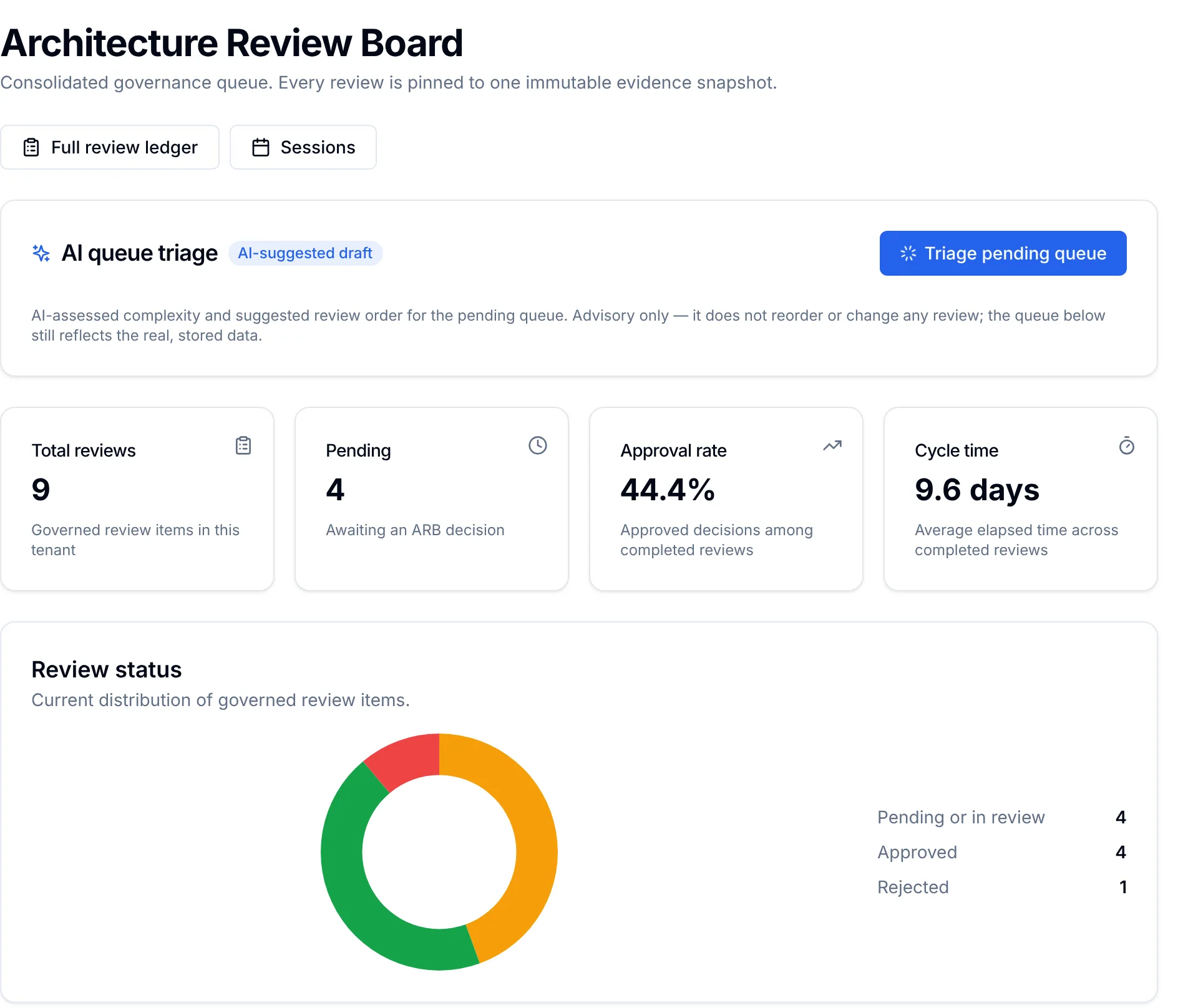
- The review board, where a change proposal, its sessions and its decision are held against the evidence pinned when the proposal was submitted, with impact analysis beside it — see Architecture Review Board.
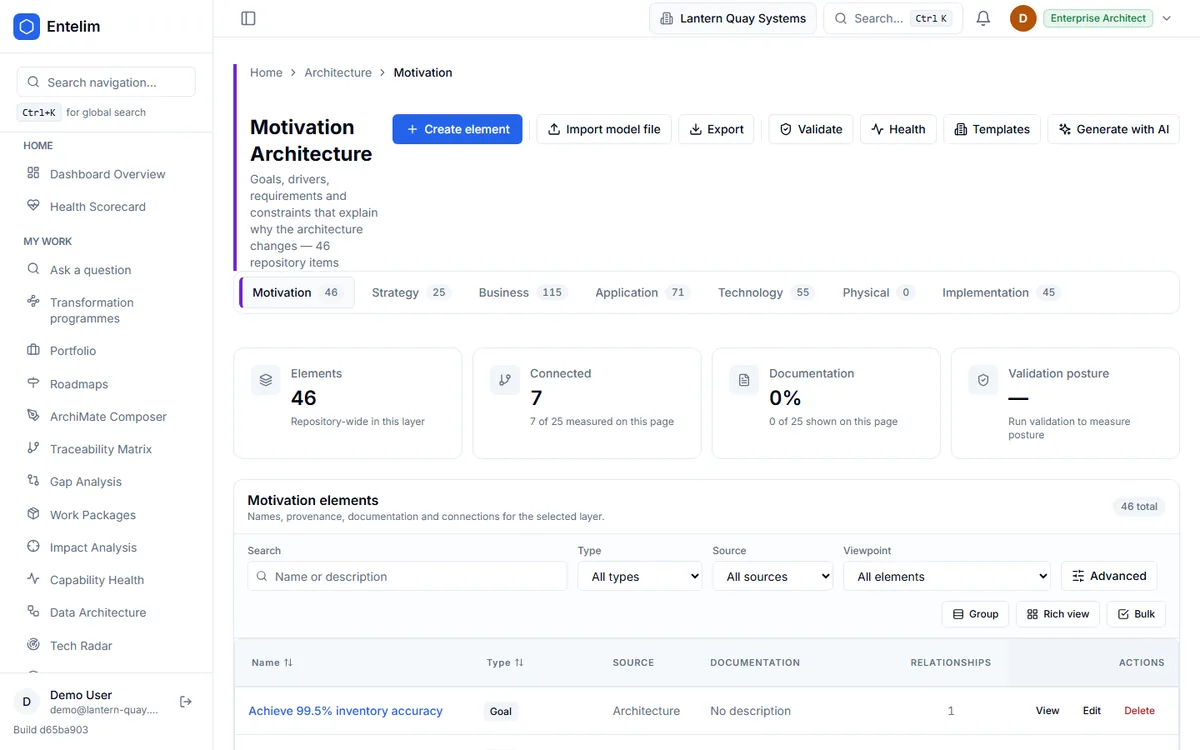
- The architecture model, the element browser every imported model lands in, across the business, application and technology layers — see Architecture Model.
Technology leaders see the same review board from their own workspace; read how CTOs and CIOs use it on CTOs and CIOs.
A week with Entelim
- Bring your existing model in: an ArchiMate Open Exchange or .archimate export lands in the architecture model browser with its elements and relationships intact.
- Ask the AI chat — what breaks if this application fails, which value streams sit on an immature capability — and read the traced answer, with the twin map to see it.
- Check the roadmap's gap register for the affected stage, and the transformation programme it belongs to, with cost shown as genuinely missing where nobody has entered it, never a silent zero.
- Open Composer to see the change in the enterprise-wide diagram, and save the view.
- Take the proposal to the review board with its evidence pinned, run impact analysis beside it, and record the decision — approved, approved with conditions, rejected or deferred.
What you hand over
A roadmap's gap register with the projects closing each gap; a programme's dates, status and cost per work package, with any missing figure shown as missing rather than guessed; a review board decision with its rationale and conditions; and a diagram or twin-map trace that shows exactly what a change touches, built from the model rather than redrawn for the meeting.
Works with
An imported Archi or Open Exchange model puts everything on one model from day one. From there, connect an AI assistant to carry these same questions into a conversation you are already having, read-only and scoped to your own data, and pull configuration items from ServiceNow's CMDB into the application inventory.
Limits
The model answers from what is actually recorded in it; it does not discover systems or dependencies on its own, so an import or a recorded element has to exist before a question about it can be answered. The review board's decision is still made by the people on it — Entelim holds the evidence and the record, not the judgement. Tech radar classifies technology already in the model; it does not add technology to the model by itself.
Frequently asked questions
How long until the first answer?
As soon as your model is imported. An ArchiMate Open Exchange or .archimate export brings elements, relationships and properties across intact, with an import history of what came in and when, and the AI chat reads that same import straight away — there is no separate setup step before you can ask your first question against it.
Can I import from Archi or LeanIX exports?
Yes. Entelim imports ArchiMate Open Exchange and .archimate files directly, with elements, relationships and properties intact and an import history of what came in and when, whichever tool the export came from. Compare Entelim with Archi on Entelim vs Archi.
Who needs a paid seat?
Anyone editing the model — adding elements, running a change through the review board, updating a roadmap or a programme — needs an editor seat on the Team plan, priced per editor. People who only ever ask questions in the AI chat are free, on every plan. The Community plan covers one whole organisation of up to three people at no cost at all.
Does it support ArchiMate 3.2?
Yes. The model is built on the ArchiMate 3.2 standard across the business, application, technology and motivation layers, and every import, the element browser and Composer's diagrams all use the same notation, so nothing has to be translated or redrawn to fit a different modelling language once it is in Entelim.
How is it different from a drawing tool?
A drawing tool stores a picture; Entelim stores the elements and relationships behind it, so a question such as "what breaks if this fails" is answered by tracing the model, not by someone reading a diagram and guessing. Composer still gives you the diagram, opened from the same elements.
Start free
Start free on the Community plan for one organisation of up to three people, with every question and the review board included. A growing team moves to Team, priced per editor, where people who only ask questions stay free. For a guided first assessment, see the architecture health check or Team annual onboarding. See full pricing.
Other roles
- Business architect tools that tie capabilities and value streams to the work that changes them
- Chief architect software for an architecture function you can account for
- CIO dashboard software for CTOs and technology leaders
- Data architect tools that tie every data flow to a real element in the model
- IT portfolio manager software for a portfolio you can defend at budget time
- Know what you run, who owns it and what breaks if it fails — starting from GitHub or Jira
- Know what your startup runs and who owns it, from the day you connect GitHub
- Security architect tools that show what a risk reaches, not just where it was logged
- Solution architect tools for a design the review board can actually decide on
- Architecture Review Board
- Take a change through the review board with its evidence pinned to the decision
- What breaks if this service or platform fails, and who gets called?
- What happens to my business if this person, supplier or system underperforms?
- Which contracts renew soon, and what depends on them?
Choose a plan
Annual billing is selected; monthly is one click away. Any tax due is shown on the payment page before you pay.
Import your model and get a free, cited answer to what breaks if a system fails, in minutes.