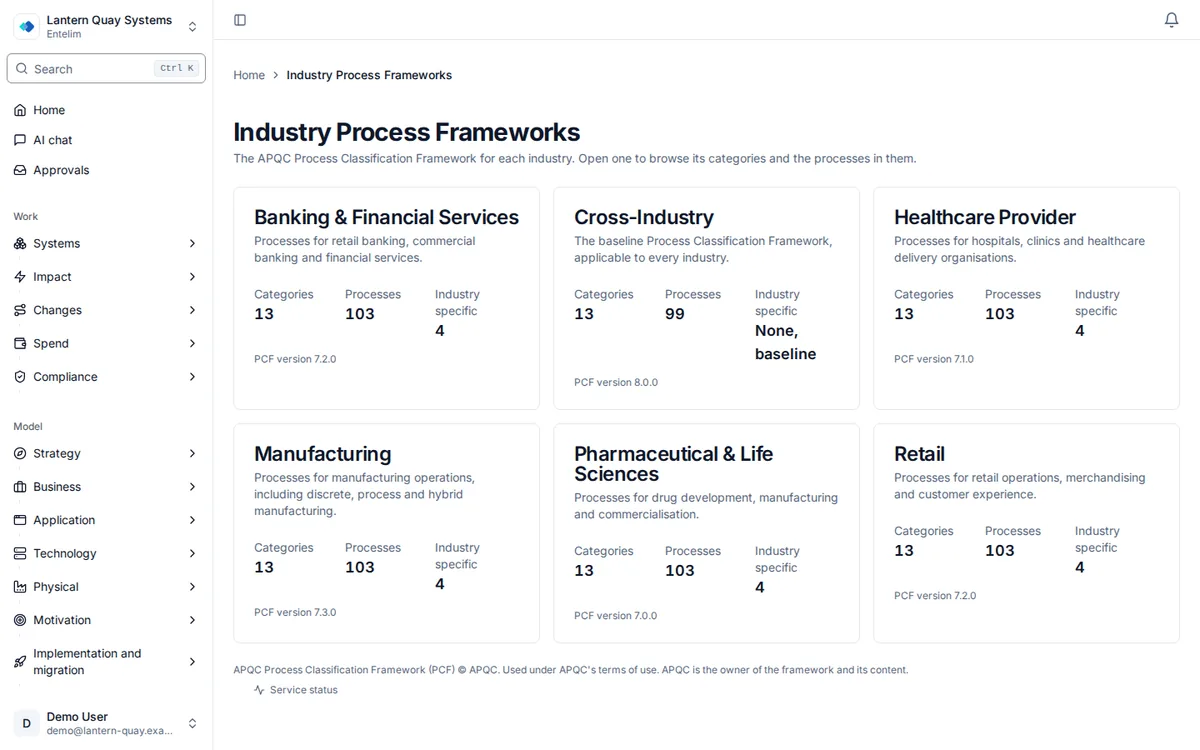
Browse the standard process frameworks for your industry

Six industry process classification frameworks with their regulatory intensity, typical digital maturity and process complexity, to use as a reference before you record your own.

Screenshot of the industry process classification dashboard for the demonstration company.
The industry process classification, with its process groups and coverage.
Opens the industry process frameworks, one for each industry, and then the banking framework with its categories and process counts. Opening a category lists the processes inside it.

Who it is for

Made for the people who answer for this.

  • A platform administrator setting up a new organisation.
  • An enterprise architect or portfolio manager sizing how much process governance a project needs.
  • A consultant comparing sectors.

Questions it answers

Ask it the questions you are asked.

How regulated is a bank compared with a retailer?

Asked by an enterprise architect.

Which processes are unique to our industry?

Asked by a business architect.

Which improvements are quick wins?

Asked by a portfolio manager.

Which framework should we seed first?

Asked by a platform administrator.

How it works

From your data to an answer, in steps.

  1. Step 1

    Open the dashboard

    Find it from the Modules page, under More tools.

  2. Step 2

    Seed the frameworks

    A platform administrator creates the six shared frameworks.

  3. Step 3

    Read a framework

    Process counts, regulatory processes and maturity target.

  4. Step 4

    Check recommendations

    Filter improvement suggestions by industry and quick wins.

What an APQC process classification framework is

APQC, the American Productivity & Quality Center, publishes the Process Classification Framework (PCF): a standard description of what a business does, organised into broad categories and then into named processes, written so that two different companies can compare how they work without first agreeing on a shared vocabulary. Alongside the cross-industry PCF, APQC publishes variants for sectors whose processes and regulatory load differ enough to warrant their own version, such as banking, healthcare or manufacturing.

Entelim stores each of these as an industry framework: a named profile with its own PCF version number, a regulatory-intensity rating (low to very high), a typical digital-maturity score out of five, a process-complexity rating, and two lists of named processes — key differentiators and industry-unique process areas — that describe what sets the industry apart from the cross-industry baseline.

This matters before you have recorded a single process of your own. Comparing a pharmaceutical company's profile (highly complex, very high regulatory intensity) against a retailer's (moderate complexity, low regulatory intensity) tells you, in under a minute, how much governance and process detail to expect before anyone on your team starts recording the real thing.

How it works in Entelim

  1. Open it from the modules directory. Industry APQC is not on any one role's own sidebar; open it from the Modules page, under "More tools", or go straight to the Industry APQC dashboard.
  2. Seed the shared frameworks. On a new organisation the dashboard shows "No Frameworks Available" with a Seed Default Frameworks button. A platform administrator clicks it to create six framework records in one step: Cross-Industry, Manufacturing, Banking & Financial Services, Healthcare Provider, Pharmaceutical & Life Sciences and Retail. Anyone else who clicks it sees an error, because seeding is a platform-administrator action.
  3. Read the dashboard. Four counts across the top total what has been seeded: Industry Frameworks, Total Processes, Industry-Unique Processes and Regulatory Processes. Below them, a card per framework shows its name, its code and its PCF version, and a Framework Statistics table lists each framework's process counts and its process-complexity rating.
  4. Open a framework. Clicking a card opens its own page: four stats (Total Processes, Industry Unique, Regulatory, Maturity Target), a Framework Info panel (PCF version, regulatory intensity, process complexity and active status), a Processes by Category breakdown, and a table of up to 20 named processes with their code, name and category, for any process actually recorded against that framework.
  5. Check Recommendations. The View Recommendations screen lists process-improvement suggestions, filterable by industry and by quick wins, each with a recommendation type, an impact score, an effort score and a priority score out of ten.

The six frameworks available today

  • Cross-Industry (PCF 8.0.0, low regulatory intensity, moderate complexity): the baseline PCF that applies to every industry, with no industry-specific differentiators of its own.
  • Manufacturing (PCF 7.3.0, medium regulatory intensity, complex): differentiated by supply chain and logistics optimisation and production planning and scheduling, with shop floor management and material requirements planning (MRP) named as unique process areas.
  • Banking & Financial Services (PCF 7.2.0, very high regulatory intensity, highly complex): differentiated by regulatory compliance (SOX, Basel III, Dodd-Frank) and customer onboarding and KYC/AML, with credit risk modelling and regulatory reporting (CCAR, DFAST) named as unique process areas.
  • Healthcare Provider (PCF 7.1.0, very high regulatory intensity, highly complex): differentiated by patient care delivery and safety and HIPAA compliance, with clinical decision support and utilisation management named as unique process areas.
  • Pharmaceutical & Life Sciences (PCF 7.0.0, very high regulatory intensity, highly complex): differentiated by FDA compliance (21 CFR Part 11) and clinical trial management, with batch record management and adverse event reporting named as unique process areas.
  • Retail (PCF 7.2.0, low regulatory intensity, moderate complexity): differentiated by omnichannel customer experience and merchandise planning, with assortment planning and last-mile delivery named as unique process areas.

What you get

  • Six seeded industry framework profiles, each with a PCF version, a regulatory-intensity rating and a digital-maturity score out of five.
  • A key-differentiators list and a unique-process-areas list per framework, naming the processes that set the industry apart from the cross-industry baseline.
  • Four dashboard counts: frameworks, total processes, industry-unique processes and regulatory processes.
  • A framework detail page with a processes-by-category breakdown and a table of named processes, for any framework that has processes recorded against it.
  • A recommendations list, filterable by industry and by quick wins, scoring each suggestion for impact, effort and priority.

Limits

Seeding the six default frameworks creates their profiles and benchmark ratings; it does not add any processes underneath them. A freshly seeded framework reads zero total processes until individual processes are recorded against it, and Entelim has no screen today that adds a process to a framework. Use the ArchiMate model import to build and record your own process and capability model instead.

Seeding is a platform-administrator action, shared across your whole organisation rather than set per person. Everyone signed in can read what has already been seeded.

Entelim's industry code list recognises more sectors than it seeds by default — insurance, telecommunications, utilities, government, education and six more carry a code but no seeded profile yet. Only the six listed above are created when Seed Default Frameworks is run.

The recommendations list reads suggestions already generated from a maturity assessment; it does not include an on-screen form to run that assessment, and with no processes seeded under the default frameworks there is nothing yet to assess.

Plan

Viewing the industry frameworks is included on every Entelim plan, from the free Community plan upward; seeding frameworks for your own organisation needs a platform administrator. See Entelim pricing, or browse all modules.

Start today

Connect your tools. Get a cited answer.

Free for up to three people, with no trial clock. Self-host it free under AGPL-3.0, at any size.