See where each capability stands against its target

A heat grid of current against target maturity for every capability, with unassessed capabilities shown as missing, not guessed.

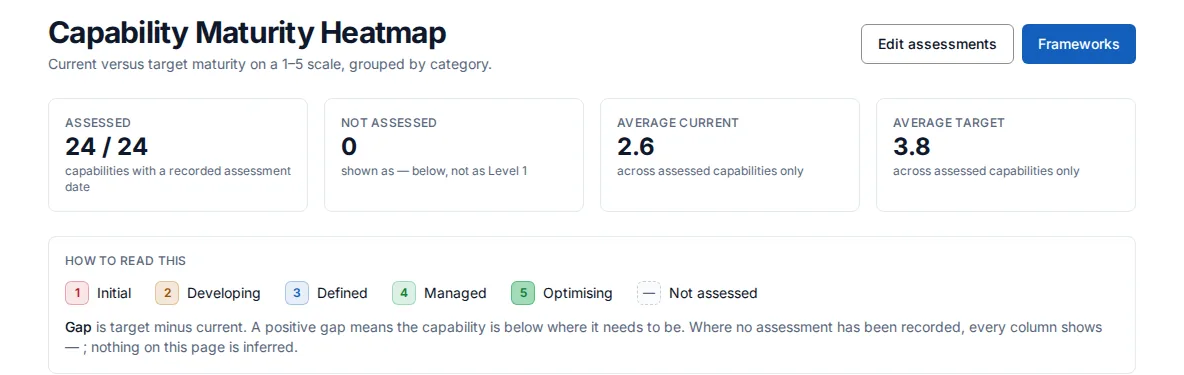
Screenshot of the capability maturity page showing the assessed count and the average current and target maturity for the demonstration company.
Capability maturity: how many capabilities have a recorded assessment, and the average current and target level.

Who it is for

Made for the people who answer for this.

  • A business architect who has to show where capabilities fall short of their targets.
  • A CTO or portfolio manager choosing where to invest next.

Questions it answers

Ask it the questions you are asked.

Which capabilities are furthest below their target?

Asked by a business architect.

How many capabilities have actually been assessed?

Asked by a portfolio manager.

Who owns this capability, and what is acting on it?

Asked by a CTO.

How does maturity compare across our frameworks?

Asked by an enterprise architect.

How it works

From your data to an answer, in steps.

  1. Step 1

    Record assessments

    Levels are entered by hand, one capability at a time or in a batch, or imported from a CSV.

  2. Step 2

    Read the heatmap

    Current level, target level and the gap, grouped by category.

  3. Step 3

    Spot what is missing

    A capability with no assessment date shows a dash, never Level 1.

  4. Step 4

    Open a capability

    See its maturity, owner and the initiatives acting on it.

What this module does

The heatmap lists your capabilities by category on a five-point scale from Initial to Optimising, showing current level, target level and the gap between them. A capability counts as assessed only once an assessment date is recorded; until then every level shows as a dash rather than as Level 1, and the page states how many capabilities are assessed out of the total. Averages cover assessed capabilities only. Each capability opens a line-of-sight view of its maturity, owner and the initiatives acting on it.

A separate frameworks overview compares maturity across the frameworks your capabilities are classified under. Levels are entered by hand, one capability at a time or in a batch, or imported from a CSV; they are not calculated for you.

Available on a paid plan. See plans.

Start today

Connect your tools. Get a cited answer.

Free for up to three people, with no trial clock. Self-host it free under AGPL-3.0, at any size.